Out of beta. Out of the cloud.
Anymatix is out: open generative AI shipped as a curated whole — the interface, the cards, the models, the engine and the installation, chosen and tested together — running on hardware you control, with no cloud of ours in between. And a new way to work: cards instead of workflows.
By Vincenzo
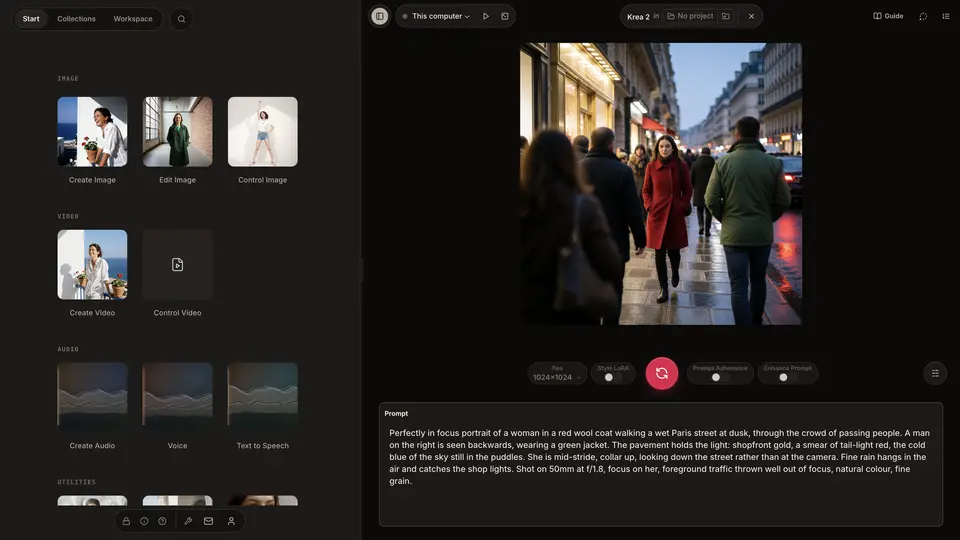
It is out
After months of beta and twelve releases, Anymatix is out.
Thank you to everyone who ran the betas, filed the odd crash, and kept using it anyway. You are the reason the app knows what it wants to be.
The first app that takes the cloud — and the hacking — out of the loop
Until now you got to pick one.
A website: easy, and it is someone else's computer, someone else's rules, and your credits going down.
Or your own machine: free, private, unlimited — after a weekend of Python versions, CUDA, custom nodes and model paths, and another one every time something updates.
Anymatix takes both out of the loop. It runs on your computer, and it does the setting up itself — the engine, its extensions and the model files, wherever the work happens: on this machine, on a computer of your own over SSH, or on a rented GPU it starts and stops for you. You do not install, patch or wire anything.
- Your models sit in your folders. Bring your own, keep them forever, use them offline.
- Your pictures land on your disk as ordinary files. Copy the folder to another machine and the history, the gallery and the ratings come with it.
- Weights are fetched from the original host: Civitai, Hugging Face, and files you already have.
- And if you want a bigger machine for an afternoon, or for a lifetime: rent one by the hour, or point the app at a computer you already have over SSH. Either way the premises are yours and so are the rules.
Curated, from the interface to the install
Everything in Anymatix was chosen. Five layers, each one a decision taken and tested before it shipped.
The interface. Cards on a workspace. Pick the card for the thing you want, read its inputs, press Run.
The cards. Eight things you can make — Create Image, Edit Image, Control Image, Create Video, Control Video, Create Audio, Voice, Text to Speech — and seven more groups of utilities around them: analyse an image, upscale an image or a video, enhance detail, interpolate, make a mask, remove a background. 38 cards in 15 groups — 29 inside the eight actions, 9 in the utilities. Each action opens on a card chosen for that job, and every card carries a written guide to the model it runs.
The models. One chosen per card, each showing the licence it ships under. Weights come from the publisher who made them: Civitai, Hugging Face, and files you already have.
The engine and its extensions. Every component is fixed to an exact build and tested as a set, so installing today and installing in March give you the same machine. A card answers the same next month as it does now. Updates arrive about monthly.
The installation. The app installs the engine, its extensions and every model file itself: on this machine, on a computer of your own over SSH, or on a GPU you rent by the minute.
Cards, not workflows
This is the part I am proudest of.
Under the hood it is the engine everyone already loves and talks about: ComfyUI. The same models, the same graph, nothing watered down. What changes is the interface, and it turns the thing on its head. No canvas. No wires. No spaghetti.
A card is a unit of computation. It has a name, a picture, a few inputs you can read, and a Run button. You pick one up and use it. If you want to go deeper you can: open it, change a value, swap the model, link one card's output into another card's input, group a whole section into a single reusable card and ungroup it again later.
There are eight things you can make, and each opens on a card chosen for that job: Create Image opens on one, and six more sit in the group beside it. The utilities stand around those eight. The names are the point — a card is called Create Image or Control Video, which is what you want, rather than the model that happens to do it.
It is the difference between order and chaos, and it turns out order is also lovelier to look at.
What is in it
Everything below is part of the app, but a few things are marked closed beta: a free licence does not open them yet.
Making things
- 38 curated cards in 15 groups — Create, Edit, Control, Analyze and more, each with a written guide.
- Images — text to image, image to image, ControlNets for pose, edges and depth, masks, background removal.
- Video — LTX 2.3 image to video, first-and-last-frame, and a control card you hand a clip to: your subject moves the way the clip moves, and the mouth follows the sound.
- Sound — song generation and remix, voice cloning, and Speak Text: type a sentence and hear it.
- Image and audio to video — a picture, a soundtrack, and a performance that follows it.
- Upscale, detail and interpolation for both stills and video.
- Record straight into an input — microphone and webcam, then trim, crop, resize, reverse, change speed or frame rate on the card.
- Output formats — the real file at the quality the card ships with, and a selector that says what each setting costs.
Working with cards
- Focus view — open one card, edit its inputs, run it.
- Linked cards — one card takes its input from another; edit the value once and every card using it follows. (closed beta)
- Fold and unfold — fold a section into a single reusable card, unfold it to get the parts back. (closed beta)
- Run a card over a list — drop a section of many items onto an input and it runs across all of them. (closed beta)
- Run history per card — every run kept, revisitable, deletable — and undo/redo on every value you change.
- Change the model on a card — swap it from the gallery; the rest of the card stays as it is. (closed beta)
Machines
- One switch for where the work happens: this computer, a computer of your own over SSH, or a rented cloud GPU.
- A managed runtime — the app fetches the engine, its extensions and the model files, then keeps them current.
- RunPod, reduced to paying for the minutes you use. Pick a GPU, work, stop. The pod switches itself off when the app stops talking to it, on your own account.
- A model manager that says what is installed, what a card needs, and what is missing.
- Browse and install models from Civitai without leaving the app. (closed beta)
Agents, if you want them
- Claude and Codex drive the app over an authenticated API on your own machine: 119 actions.
- Default closed: an agent sees only the sections you have shared.
Your archive
- Every output kept on your own disk, content-addressed — the filename is the fingerprint of the content — so nothing is re-downloaded and nothing you kept is computed twice.
- Gallery, history and trash for everything you make.
- Every result is addressed by what made it — the model, the values, everything upstream. Ask for something already computed and it comes back instantly. That determinism is ours, not the engine's.
…and much more.
Download it — it is free to start, and it runs where your work already lives.
Vincenzo